Setting Up the IP Address
You can change the default IP configuration for the Lab LAN interface of the InfinityLab Assist Hub. Lab LAN is reserved for the system connection to the PC or laboratory LAN infrastructure.
- The configuration switch on the left side of the Assist Hub must be in the front (right) position. For details on the configuration switch, see Connections Assist Hub.
- To configure the connection settings, you need the permission Configure network connection. The roles Maintenance Technician, Agilent Service Technician, or Administrator have this permission by default.
NOTE
Select the connection settings carefully. The default IP configuration may cause network problems in your local area network.
Log in to the Assist Control Software.
Under
 Settings > Instrument > Connection Settings, configure the IP address.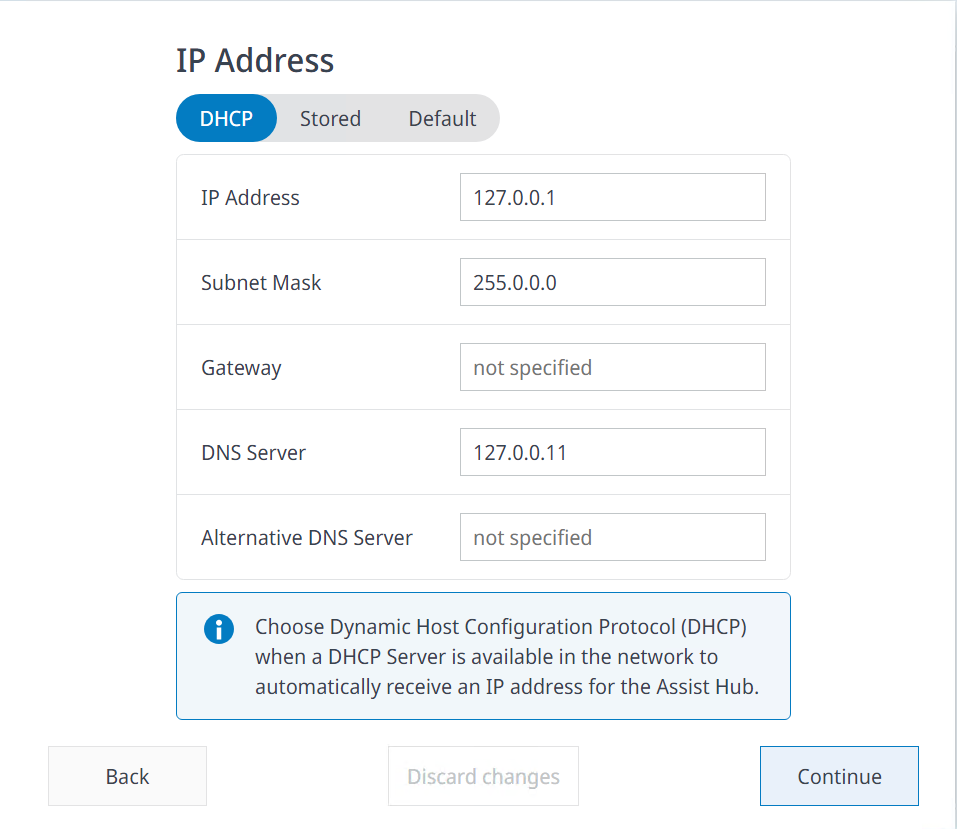
- You can choose between DHCP, Stored, or Default.
Parameter | Description |
|---|---|
| DHCP requires a DHCP server in your network. The DHCP server assigns the IP configuration automatically. The IP configuration is displayed (if assigned). |
| Stored allows you to specify the IP configuration. IP Address and Subnet Mask are mandatory. Gateway, DNS Server, and Alternative DNS Server are optional. If the option Allow Multiple IP Addresses is enabled, you can assign two different IP addresses. The two IP addresses must be on the same network. |
| Default sets the default IP configuration. You cannot change it. The default IP configuration:
|



Select  to access the online help for more details.
base-id: 10233303307
id: 36028807252267275